Style
Snapmaker U1 Review 2026: Is It the Best Multicolor 3D Printer to Buy?
August 01, 2026
The world of 3D printing has changed significantly in recent years. What was once considered a technical hobby requiring advanced knowledge has become much more accessible for creators, businesses, engineers, and everyday makers.
One area that has seen major improvement is multicolor 3D printing. Users no longer want machines that only produce basic single-color models. They want printers that can create detailed products, colorful designs, prototypes, and professional-looking parts with less waste and less manual work.
This is where the Snapmaker U1 enters the conversation.
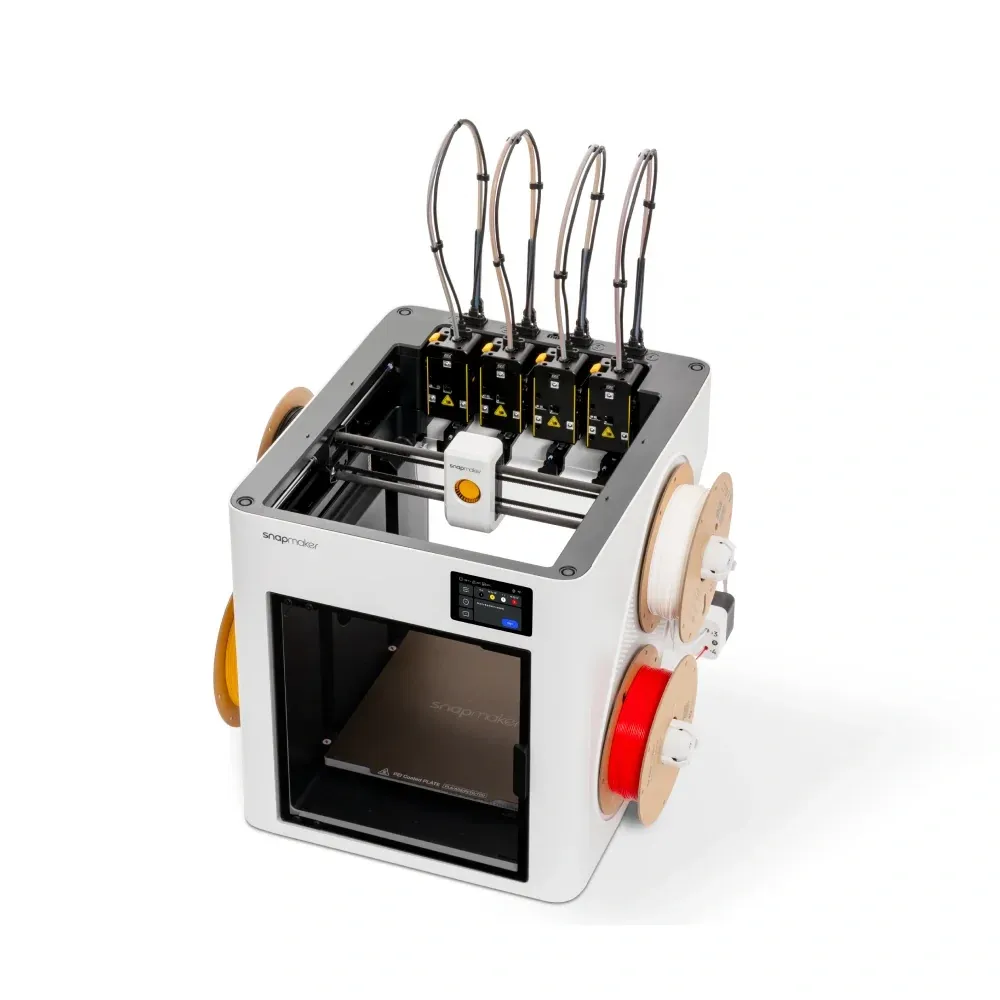
The Snapmaker U1 is designed as a next-generation multicolor 3D printer focused on speed, efficiency, and a smoother creative workflow. Instead of using a traditional single-nozzle filament-changing system, Snapmaker introduces a four-toolhead approach designed to make color changes faster while reducing unnecessary filament waste.
What Makes Snapmaker U1 Different?
The biggest difference between the Snapmaker U1 and many traditional 3D printers is the way it handles multicolor printing.
Most multicolor printers rely on switching different filaments through a single nozzle. While this method works, it often requires purging old filament before changing colors, which can create additional waste.
The Snapmaker U1 takes a different approach by using multiple independent toolheads. This design allows the printer to switch between colors and materials more efficiently.
For creators who regularly print colorful models, product samples, collectibles, or custom designs, this approach can make a noticeable difference.
Instead of focusing only on raw printing speed, Snapmaker is targeting a bigger problem in the 3D printing industry: creating high-quality multicolor prints while improving efficiency.
Snapmaker U1 Design and Performance Review
The Snapmaker U1 uses a CoreXY motion system, a technology commonly found in high-performance 3D printers.
This design allows fast movement while maintaining stability and print accuracy.
For users, this means the printer is suitable for a wide range of projects, including detailed models, functional parts, prototypes, and small business products.
The printer is designed for creators who want professional results without moving into expensive industrial equipment.
Whether you are designing products, building prototypes, or creating customized items, performance and reliability are two of the most important factors when choosing a 3D printer.
Multicolor Printing: Is Snapmaker U1 Better Than Traditional Systems?
Multicolor printing is the main reason many users are interested in the Snapmaker U1.
Traditional systems can produce beautiful results, but the process often involves wasted filament during color changes.
For hobby users, this may not seem like a major issue.
However, for businesses or creators producing many products, wasted material can increase costs over time.
The Snapmaker U1 is designed to reduce this problem by using a different toolhead switching method.
This makes it especially attractive for:
- Product designers
- Small businesses
- Etsy sellers
- Engineers
- Collectible creators
- Educational users
For anyone who frequently creates colorful prints, the Snapmaker U1 offers a more efficient workflow.
Snapmaker U1 vs Bambu Lab: Which One Should You Buy?
One of the biggest searches among 3D printer buyers is Snapmaker U1 vs Bambu Lab.
Both brands have built strong reputations, but their goals are different.
Bambu Lab has become extremely popular because of its simple user experience, fast printing, and strong software ecosystem.
Many beginners choose Bambu Lab because it provides an easy path from downloading a model to creating a finished print.
The U1 focuses heavily on multicolor efficiency, creative flexibility, and reducing waste during complex projects.
If you mainly want fast, reliable 3D printing with minimal learning, Bambu Lab may be the better choice.
If you want a machine focused on creative possibilities and efficient multicolor printing, the Snapmaker U1 becomes a very interesting option.
For a complete comparison, you can also read our guide:
Snapmaker vs Bambu Lab: Which 3D Printer Is Better in 2026?
Is Snapmaker U1 Good for Beginners?
Modern 3D printers are much easier to use than older generations.
The Snapmaker U1 includes automation features designed to simplify setup and improve the overall printing experience.
Beginners can use it to learn:
- 3D design
- Printing workflows
- Material selection
- Product development
However, the U1 is not only designed for beginners.
Its advanced features also make it appealing to experienced makers who want more control and creative options.
Someone buying their first printer who wants a machine they can grow into may find the Snapmaker U1 a strong long-term investment.
Snapmaker U1 for Small Business and Creators
One of the strongest use cases for the Snapmaker U1 is small business production.
Many entrepreneurs use 3D printers to create:
- Customized products
- Prototype designs
- Personalized gifts
- Replacement parts
- Online store inventory
Multicolor printing adds another level of creativity because products can include logos, colors, branding elements, and detailed designs.
For businesses selling customized products, reducing material waste while improving production quality can have a direct impact on profitability.
This makes the Snapmaker U1 an interesting option for creators who want to turn 3D printing into a business opportunity.
Snapmaker U1 Coupon Code, Discount and Deals
Because the Snapmaker U1 is a premium 3D printer, many buyers search for ways to save money before purchasing.
Popular searches include:
- Snapmaker U1 coupon code
- Snapmaker U1 promo code
- Snapmaker U1 discount code
- Snapmaker U1 sale
- Snapmaker U1 deals
Before buying, customers should check current promotions, seasonal sales, and available offers.
A good Snapmaker U1 deal can make upgrading to a professional-level multicolor 3D printer more affordable.
Snapmaker U1 Pros and Cons
The Snapmaker U1 offers several advantages for modern makers. Its biggest strengths are efficient multicolor printing, advanced workflow options, strong performance, and flexibility for creative projects.
The main consideration is that it may be more advanced than necessary for users who only want simple single-color prints.
For beginners who want to explore advanced projects or creators who need more flexibility, the additional features can make the investment worthwhile.
The Snapmaker U1 is one of the most interesting multicolor 3D printers entering the market.
Instead of simply competing on speed, it focuses on improving the overall multicolor printing experience.
Its biggest advantage is the ability to create detailed, colorful projects while reducing some of the waste associated with traditional filament-changing systems.
For hobbyists, designers, engineers, and small businesses, the Snapmaker U1 offers a powerful combination of performance and creativity.
Frequently Asked Questions
-
Is Snapmaker U1 worth buying in 2026?
The Snapmaker U1 is worth considering for users who want advanced multicolor printing, creative flexibility, and professional-quality results.
-
Is Snapmaker U1 better than Bambu Lab?
Both brands have different strengths. Snapmaker focuses on multicolor efficiency, while Bambu Lab focuses on a highly refined 3D printing ecosystem.
-
Does Snapmaker U1 use less filament waste?
The Snapmaker U1 is designed to reduce waste during multicolor printing compared with traditional filament switching methods.
-
Where can I find a Snapmaker U1 coupon code?
Snapmaker promotions and discounts can change regularly, so buyers should check current offers before purchasing.
-
What is the best multicolor 3D printer in 2026?
The best choice depends on your needs. Snapmaker U1 is one of the strongest options for users focused on efficient multicolor printing.
Leave a Reply
Your email address will not be published. Required fields are marked